Hello! I was using mudfish to connect to Japan servers with low enough ping to not get kicked as my servers in OCE are too dead and queue times are quite long. Now when i connect i get a error message in the bsg launcher saying my activity is sussy… Any work around here? as i can’t play without waiting for 15-20 mins avg for a game…
Hi! Please close the BSG launcher, change your game’s Mudfish node from Tokyo - Google 3 to Tokyo - Google 4, save, and reopen the launcher. BSG may be blocking the current node’s IP; changing nodes was suggested for similar errors.
If it persists, fully exit Mudfish and test the launcher again. Please share the result and a screenshot of the full error, hiding personal details.
Are you playing regular Tarkov or Arena? Your enabled item is Escape from Tarkov: Arena; please use the item matching your game.
Hey! Apologies i meant EFT Arena. After Changing nodes I am
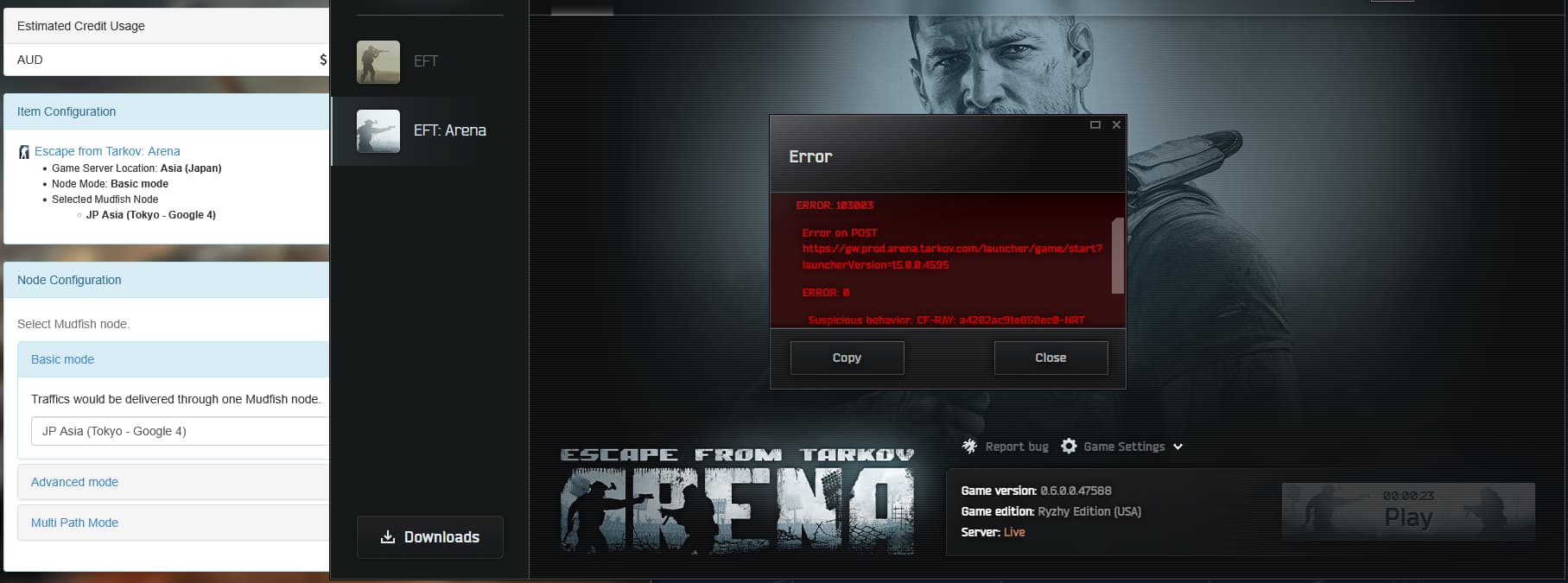
still encountering same issue! Thanks for the fast response time as well!
Thanks for confirming Arena! Please fully exit Mudfish, restart the BSG launcher, and try launching Arena. Does error 103003 disappear?
If it still fails with Mudfish off, follow BSG’s guidance: email support@battlestategames.com with subject “IP unblock”, a brief description, and the error screenshot (including CF-RAY). Include your public IP, checked at https://2ip.io with Mudfish off, in that private email.
Hey yes it runs fine without Mudfish enabled. Only having issues once Mudfish is turned on.
After playing around with Node configuration I found one that didn’t give me an error. It just took a bit of trial and error but it’s all working now! 
Glad to hear Arena is working now! Thanks for testing different nodes and sharing the update. You can keep using the node that works for you. If you run into any further issues, please let us know.