I am a Phantasy Star Online 2 player on the Japanese server. I use Mudfish to bypass the regional lock, but lately, I’ve noticed a significant decrease in the number of available Japanese nodes.
The app frequently suggests nodes from the EU or other regions, which are not helpful since they do not allow access to the game due to the region lock. When I first started using Mudfish, the connection was excellent and there were many Japanese servers to choose from.
Has something changed recently regarding your routing or server providers in Japan?
I have two specific questions:
Is Mudfish planning to stop supporting PSO2?
Is this reduction in Japanese nodes temporary, or a permanent change?
If this is just a temporary technical issue, could you please look into restoring the Japanese server list? However, if PSO2 is no longer being prioritized, I may need to reconsider my subscription.
Weird… I don’t think there’s a change of no. of mudfish JP (japan) nodes. So no increased or decreased in a view of no. of mudfish nodes.
However if you’re pointing RTT (round trip time) between EU and JP, I’m not sure what your ping was. As you know, many things are changed at the upstream ISPs since Russia-Ukraine war in a view of the international internet routing.
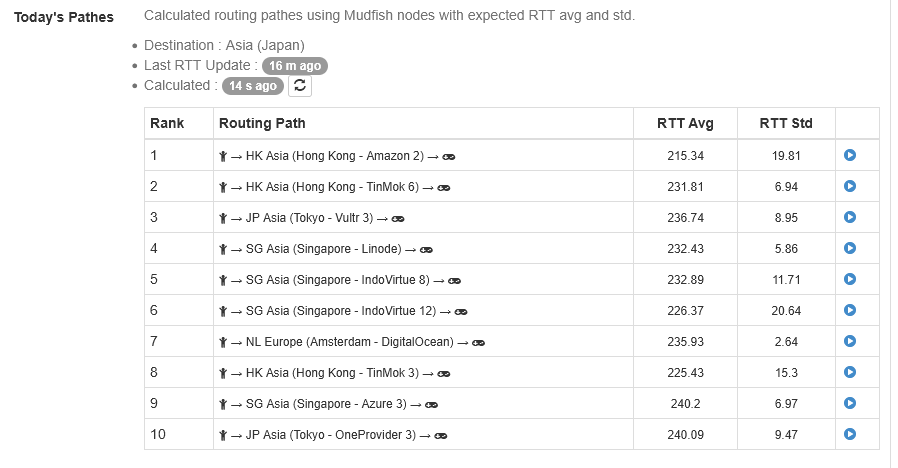
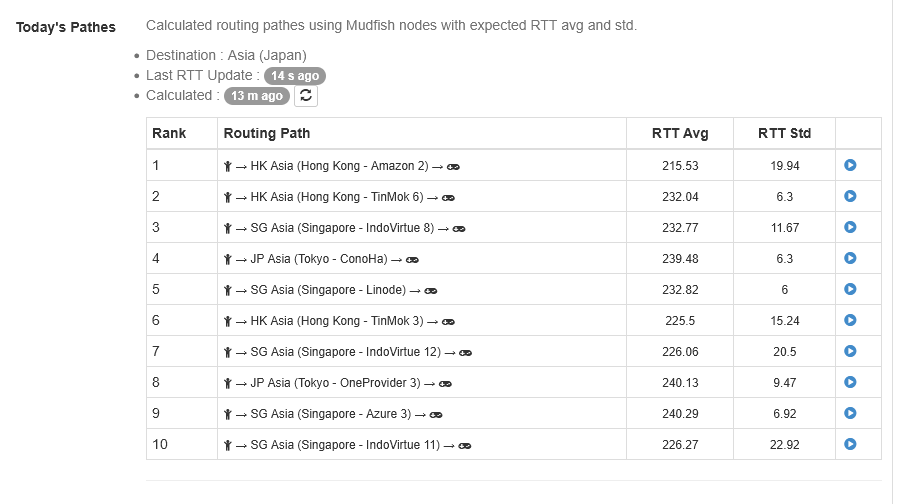
As said PSO2 JP server, is region lock since 9 June 2021 because SEGA opened the Global server in 2020, so for playing there you need to use only “Japanese” severs. For this I’m having problems, since (please check the screenshots in this message) the available servers are for a large part not from Japan so they don’t work and the few available, are pretty lagged, and this doesn’t help my problem.
I have other VPNs and Proxies, but I decided to use MUD Fish because it was faster in the beginning, but now this isn’t true anymore.
For that I asked if there were problems, because doesn’t make sense continue to use a service that is worst of the free options.
Anyway in the 2 screenshots below you can see my current status, also after the refresh, the situation doesn’t become better.
I’m sorry if I bother you with my message, but me and also my husband are having this issue since some months, so I decided to write to ask about it.
Umm… For this case, please try to turn on “Include the result for the advanced mode” option which found under ‘Setup → Nodes’ menu. When it’s enabled, Today’s Pathes will show you the advanced results for route pathes.
It could show more alternative pathes for your case.
Absolutely fine. I’m always here to answer the user’s question. Please feel free to ask anything. However please note that my answer could be delayed.