Hello. I am in SIngapore. When I try to connect to Los Angeles Server, usually the google nodes are more or less OK. Google 2/3/4/5. But when i try to connect in the morning, the ping of the node is very weird. It will be low, but suddenly increase to very high, and slowly come down again, but it will keep doing this. This happens to all the Google nodes in Los Angeles, and it may only happen in the morning. Can someone help me? I want to connect to it to play some games. I am using Full VPN mode. Here is the MTR of the google nodes
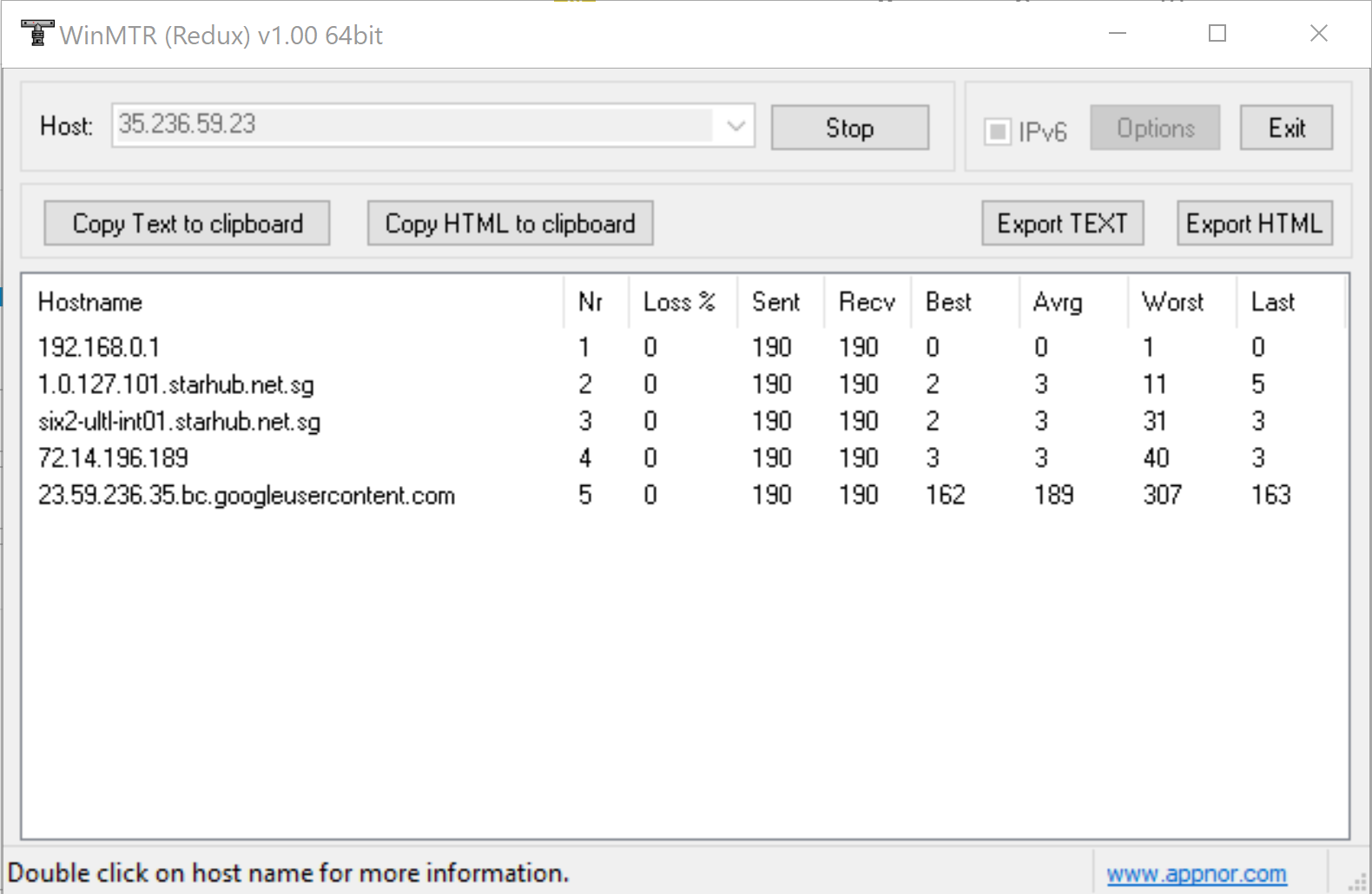

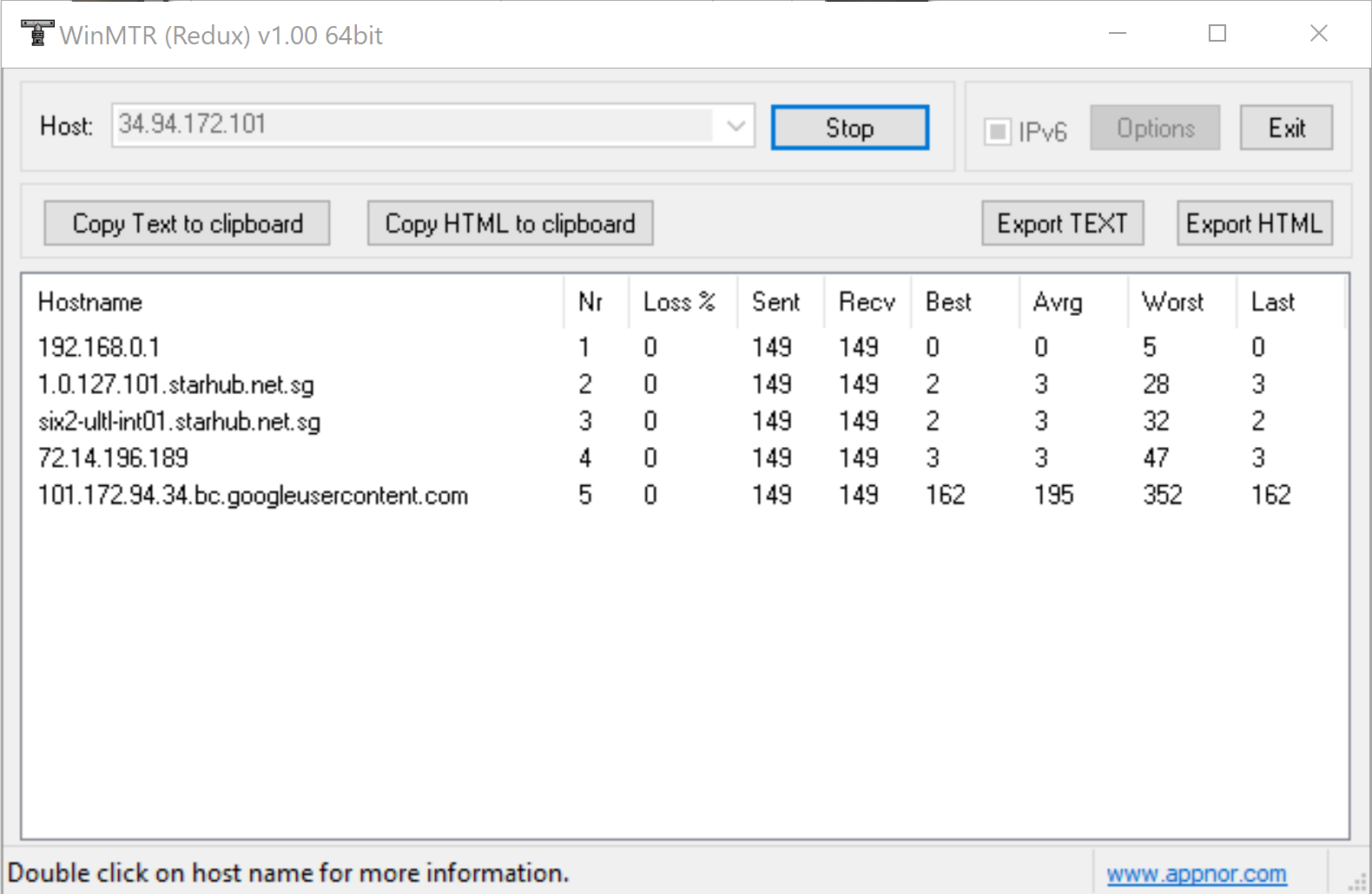

Thank you for these WinMTR screenshots. Is there any international submarine cable issue between SG and US West? Please check it first because it could affect to the this issue.
When I tested the ping tests between these regions, I can see your issue too.. The ping goes up and down rapidly. It looks like the international connections are spread to multiple international lines.
For example, there’s a result:
[SG Asia (Singapore - Vultr 2) : ~]$ ping 35.236.59.23
PING 35.236.59.23 (35.236.59.23) 56(84) bytes of data.
64 bytes from 35.236.59.23: icmp_seq=1 ttl=59 time=213 ms
64 bytes from 35.236.59.23: icmp_seq=2 ttl=59 time=211 ms
64 bytes from 35.236.59.23: icmp_seq=3 ttl=59 time=211 ms
64 bytes from 35.236.59.23: icmp_seq=4 ttl=59 time=209 ms
64 bytes from 35.236.59.23: icmp_seq=5 ttl=59 time=207 ms
64 bytes from 35.236.59.23: icmp_seq=6 ttl=59 time=206 ms
64 bytes from 35.236.59.23: icmp_seq=7 ttl=59 time=205 ms
64 bytes from 35.236.59.23: icmp_seq=8 ttl=59 time=206 ms
64 bytes from 35.236.59.23: icmp_seq=9 ttl=59 time=205 ms
64 bytes from 35.236.59.23: icmp_seq=10 ttl=59 time=204 ms
^C
--- 35.236.59.23 ping statistics ---
10 packets transmitted, 10 received, 0% packet loss, time 9708ms
rtt min/avg/max/mdev = 204.183/208.274/213.061/2.966 ms
[SG Asia (Singapore - Vultr 2) : ~]$ ping 35.236.59.23
PING 35.236.59.23 (35.236.59.23) 56(84) bytes of data.
64 bytes from 35.236.59.23: icmp_seq=1 ttl=59 time=168 ms
64 bytes from 35.236.59.23: icmp_seq=2 ttl=59 time=168 ms
64 bytes from 35.236.59.23: icmp_seq=3 ttl=59 time=168 ms
64 bytes from 35.236.59.23: icmp_seq=4 ttl=59 time=168 ms
64 bytes from 35.236.59.23: icmp_seq=5 ttl=59 time=168 ms
64 bytes from 35.236.59.23: icmp_seq=6 ttl=59 time=168 ms
^C
--- 35.236.59.23 ping statistics ---
6 packets transmitted, 6 received, 0% packet loss, time 5598ms
rtt min/avg/max/mdev = 168.233/168.370/168.576/0.117 ms
[SG Asia (Singapore - Vultr 2) :  ~]$ ping 35.236.59.23
PING 35.236.59.23 (35.236.59.23) 56(84) bytes of data.
64 bytes from 35.236.59.23: icmp_seq=1 ttl=59 time=236 ms
64 bytes from 35.236.59.23: icmp_seq=2 ttl=59 time=234 ms
64 bytes from 35.236.59.23: icmp_seq=3 ttl=59 time=233 ms
64 bytes from 35.236.59.23: icmp_seq=4 ttl=59 time=232 ms
64 bytes from 35.236.59.23: icmp_seq=5 ttl=59 time=231 ms
64 bytes from 35.236.59.23: icmp_seq=6 ttl=59 time=230 ms
64 bytes from 35.236.59.23: icmp_seq=7 ttl=59 time=228 ms
^C
--- 35.236.59.23 ping statistics ---
7 packets transmitted, 7 received, 0% packet loss, time 6774ms
rtt min/avg/max/mdev = 228.547/232.576/236.004/2.421 ms
This is two ping command tests within 30 seconds. Its ping is changing dramatically.
Hello. Thank you. I am only aware of the indigo west submarine cable fault between Australia and Singapore still being repaired. I am not aware of other faults. Any opinions on this?
Are you able to resolve this or is based on the submarine cable having an issue?
If this issue issue is triggered by something change of the upstream ISPs, as you might guess, it’s not easy to fix. We need to find that there’s other routing path between your country and US West (LA).
If possible, please try to turn on “Include the result for the advanced mode” option which found under ‘Setup → Nodes’ menu. When it’s enabled, Today’s Pathes will show you the advanced results for route pathes.
Before going futher, please make sure to visit ‘Setup → Nodes’ menu and clear your limitation for picking the mudfish nodes. If you limited no. of mudfish nodes, the result could be poor.
Thank you for replying. I also would like to inform that the nodes do not always fluctuate. For example, Google 3 might be stable and good for 1 Hr+ 162ms. Then all of a sudden it will spike in latency. It may be possible that the latency will stabilise after a while again. I tested his using MTR.
Are you also able to check with the node provider if what they are experiencing is indeed due to a ISP/submarine cable fault?
@adamleeyijia Thank you for this update. I’m waiting the response from the server provider.  I’ll update it again when I get something.
Thank you for helping. I look forward to some news.
This topic was automatically closed 21 days after the last reply. New replies are no longer allowed.