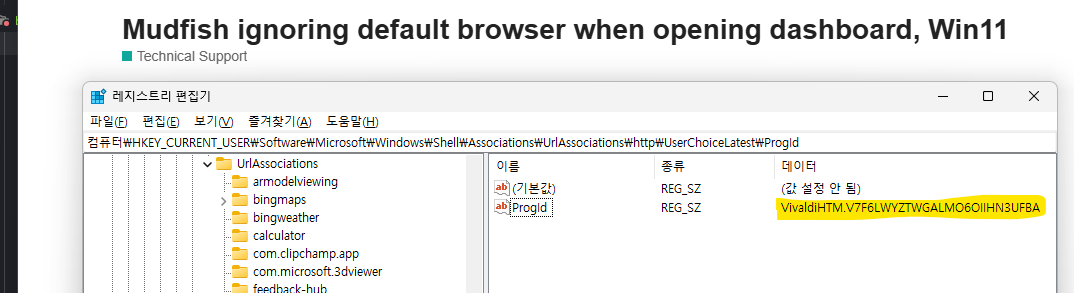
I run my default browser as Vivaldi, but when i load Mudfish, it loads Firefox instead.
Is there a setting somewhere i am missing?
I have checked and rechecked that Vivaldi is my default browser in windows.
I found the article directing me to check the registry and that’s looking how it should.
The service otherwise works fine, i just don’t like having Firefox opened when it should be my main browser, and would like to fix this if possible.
I tried to reproduce your issue at my end after changing the default browser from Chrome to Vivaldi but no luck . It works as what’s expected so it works fine…
If possible, please send us Problem Report too. I’m curious what messages are logged while finding your browser. And another one thing I’d like to mention is that, at mudfish you can use “Built-in Browser” feature too which could be found at “Setup → Program → Launcher” menu.
Deleted my other comment as i mucked up the quote lol.
But i checked and my ProgId is set to “FirefoxURL-308046B0AF4A39CB”
So ill need to investigate how to change it, as it wont let me modify it manually.
EDIT: the annoying thing is, i look at the default apps tool in windows, and HTTP and HTTPS are both set to Vivaldi, but the registry is still keeping it set to Firefox.
EDIT2: if i uninstall firefox it be haves as normal and respects my default, but if i reinstall it keeps opening firefox.
Seems something has gone wrong and windows is not updating as it should.
That sounds really frustrating. Honestly, I am not entirely sure why Firefox or Windows is refusing to respect the default browser policy in this specific case. It seems like a stubborn OS quirk.
To bypass this issue entirely, I highly recommend using the “Built-in” browser feature in Mudfish. You can enable it by navigating to Setup → Program → Launcher. This will ignore the Windows registry settings completely. Hope this helps!
Yea, still haven’t found a solution, and reaching out to windows help groups on reddit have proven fruitless, they just wont let me post my issue, and give no reason why and ghost me.
I have enabled the in build browser, and it seems to be working perfectly, so ill just stick with that.
Thanks
Still annoyed i cannot fix the root of the problem, my guess is its a windows issue, potentially caused by Firefox leaving some junk code somewhere, but the built in browser is nice and clean.