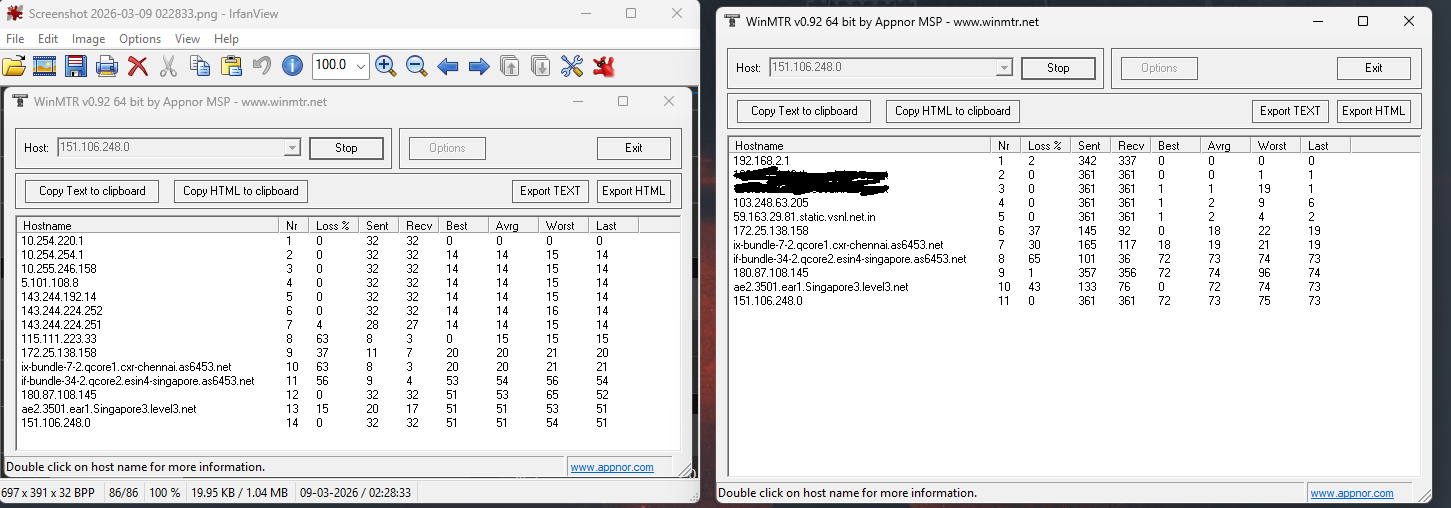
So on the left side is Bangalore digital ocean 2 node and right side is my default isp.
You can see Nr9 to 14 on the left and Nr6 to 11 on the right are same/similar still the latency to riot singapore is different. Why so even if the default route of my isp is same as the mudfish node (digital ocean2)??
This is an answer from Gemini 3.1 Pro.  I agree with that too.
That is a very good observation. While the WinMTR results show that the later routing hops (from Chennai to Singapore) are identical, there are a few technical reasons why the final latency to the Riot Singapore server is still different:
1. Asymmetric Routing (The Return Path) WinMTR measures the Round Trip Time (RTT), meaning the time it takes for a packet to go to the destination and come back. While the outbound route (going to the server) looks identical, the inbound route (returning from Riot Singapore) might be completely different. The return path to the Mudfish node (Digital Ocean) is likely much more optimized and direct than the return path to your standard ISP.
2. Peering Agreements and Traffic Priority The networks you see on the route, such as
as6453.net(Tata Communications) andlevel3.net, are massive global backbone networks. Within these networks, traffic is handled based on peering agreements. Traffic coming from a major cloud provider like Digital Ocean (where the Mudfish node is hosted) often benefits from premium routing and less congested transit links compared to standard residential ISP traffic.3. Link Aggregation (Bundles) If you look closely at the hostnames, you will notice terms like
ix-bundle...andif-bundle.... This indicates that multiple physical submarine cables are logically grouped together as a single connection. Even though the logical hostname is the same, your direct ISP traffic and the Mudfish VPN traffic might be traveling over different physical cables within that bundle, which can cause variations in latency.In summary: Even if the outbound route looks similar, the difference in latency is primarily due to the return routing path and the quality of network peering within those massive backbone networks.
1 Like
Riot Games AS6507 has a bunch of peering points around the world. Since you are India and connecting to the Singapore server your ISP might route traffic to Riot Games in India.
AS6507 Riot Games, Inc - bgp.tools
Riot Games has peering in Extreme Delhi and Extreme Mumbai. If your ISP sends the traffic there from that peering point to the actual server in Singapore it will go over Riot Games’s network not your ISP. Latency could be higher.
By using Mudfish your ISP might not have a peering to the nodes and have a more direct route to Singapore.
2 Likes
This topic was automatically closed 21 days after the last reply. New replies are no longer allowed.