When i use the check the lowest ping (RTT) for ROBLOX mumbai server’s it gets high ping all of sudden then the next day or two it decreases to it’s normal average 40 to 50 60 ish and it’s weird i live in the middle east oh forgot to mention it includes every nodes to 500 even tho it’s the closest node and it happeneds to basic node and multipath and advanced is there any workaround for it or is it my fault for it?
ngl iam experiencing the same thing i live in PH and using mudfish to route me to singapore and the ping is worse than native ping but not all the time, sometimes mudfish can be better but most its just spiking
Mudfish nodes can experience instability like most things online. Sometimes it’s the actual route (e.g. an important subset of the nodes I use depend on EllaLink, so outages there take down all my best nodes to EU), sometimes it seems to be the individual node (US West LA Google nodes and Germany LeaseWeb 3 are very good nodes for me… when they work, which isn’t always).
the thing i noticed the rtt sometimes shows wrong so i use the rtt graphics and check the lowest and select and it works like a charm!
also i ment rtt graph but do use it when u see the rtt is high and don’t know what to choose
@Kittcat13 Please try to test your network status from your desktop to 128.116.104.196 (Roblox - Asia (Mumbai)) using How to use Mudfish MTR link.
I think you need to do two tests; one without mudfish and another with mudfish connected. I think this result shows you more details where this issue is from.
hey i did what you told me to and i’m not sure what to do with the info i got from it without mudfish is 200 and changing the node to the closest and recommended dropped to 60 so yea i don’t know what to do with the information i got and i hope you can tell me what to do thanks
That’s great to hear that your ping dropped to 60 ms with Mudfish! That’s a significant improvement from 200 ms.
To help me pinpoint exactly why you’re seeing those sudden spikes and to see if we can stabilize it further, could you please share the results from the Mudfish MTR tests you performed? I’d like to take a closer look at the hop-by-hop data for both the “with” and “without” Mudfish cases.
Once you provide those results, I’ll analyze them to see where the instability is coming from. Thanks!
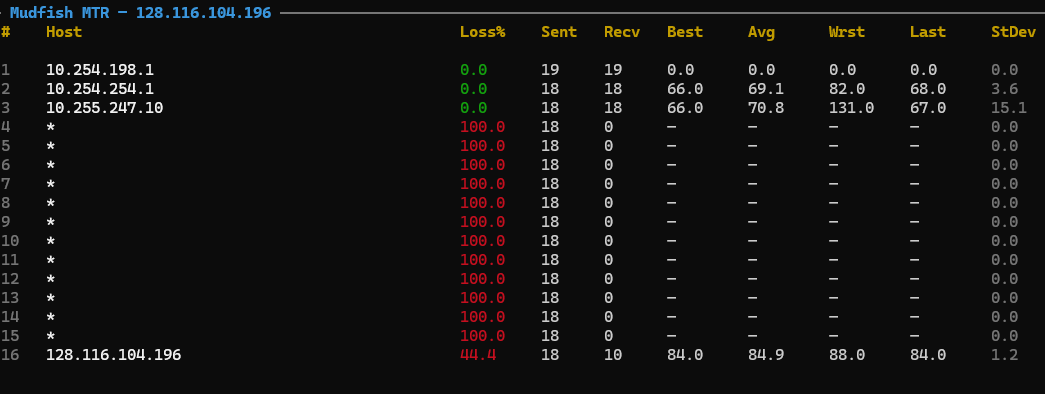
^ The top is mudfish the down is without the red covering is my ip adress that’s why, also when i first bought mudfish it was like 48 ms then increased to 50 now 60 so i think that’s my router problem
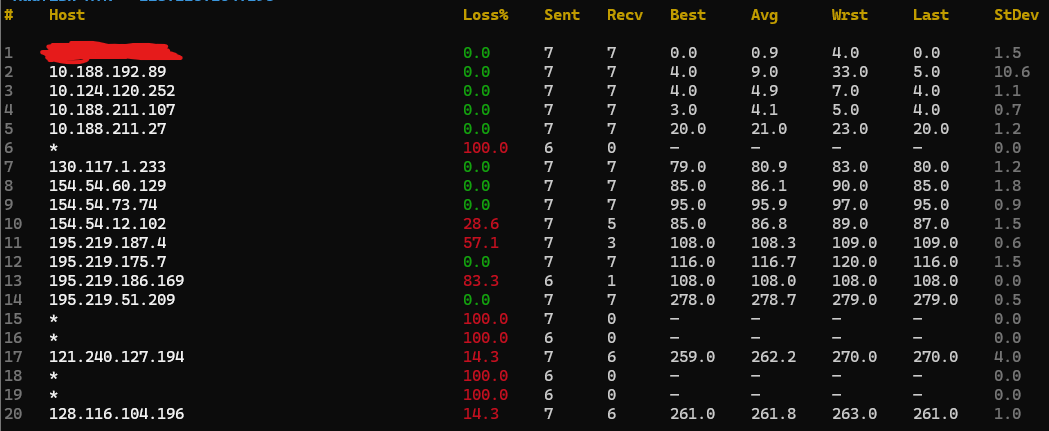
Thank you so much for the screenshots! Looking at the results, I don’t think your router is the issue. However, the hop right above your router shows a 10.6 ms standard deviation, which looks slightly unstable. Otherwise, it seems fine.
For Hop 3 (from the Mudfish node to the upstream ISP), there is a 15.1 ms deviation. This suggests the Mudfish node itself might be having a slight issue.
The best workaround right now is to simply change your Mudfish node to a different one.
good to know so this is the nodes fault and how long do we have to wait for the issue to get fixed? also thanks for your help!
okay so the nodes rtt shows high ping to the point th eclosest it shows me the USA and other western nations nodes
Please take a look at your current connection data here: http://ko.loxch.com/userrtt/?uid=1655328
Looking closely at these logs, the connection from your ISP (Internet Service Provider) seems unstable at the moment. This high instability is likely why the system is showing high ping and routing you to US nodes. Please keep this in mind, as the issue appears to stem from your local ISP’s routing.
Hey I m new to the forum and i posted about my issue, can u look into it, its regarding payment, thank u
i see so the whole time it was my isp’s problem very well thank you so much for your help
1 Like